
Shopify WordPress Integration: When a Hybrid Commerce Setup Makes Sense
A WordPress + Shopify hybrid works best for content-heavy brands with established SEO traffic and a team that can manage two platforms. For most early-stage stores, Shopify-only or WooCommerce-only is simpler, cheaper, and less risky. This article explains how to integrate Shopify with your WordPress site and when it pays off.
Most founders frame the choice as WooCommerce vs. Shopify. A third option is using WordPress website for content and Shopify for commerce. Done poorly, it adds cost, maintenance, and attribution problems. This is a decision framework, not a setup tutorial.
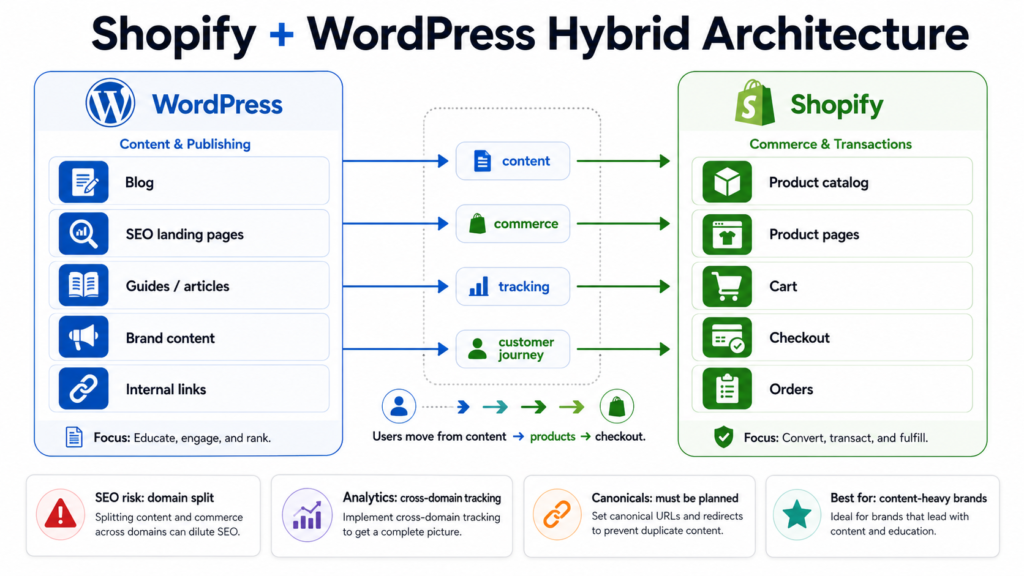
What a Shopify Plugin for WordPress Actually Does
There is no single “Shopify plugin” that solves everything. Integration is a spectrum of approaches to add Shopify commerce to your existing WordPress site, each with different ownership of URLs, checkout, content, and analytics.
| Approach | Product URLs | Checkout | Content | Analytics | SEO Risk |
| Shopify Buy Button | Shopify store | Shopify | WordPress | Split (engagement in WP, purchases in Shopify) | Thin product content on main domain |
| WordPress content + Shopify backend | Shopify subdomain/subfolder | Shopify | WordPress | Cross-domain/subdomain tracking | Domain authority split; canonical confusion |
| Linked but separate | Separate Shopify store domain | Shopify | WordPress | Full cross-domain tracking | Two sites competing for brand terms |
| Headless-like hybrid | Main domain (custom) | Shopify | WordPress | Unified frontend, complex backend | Crawlability; metadata management |
| WooCommerce-only | WordPress | WordPress | WordPress | Single property | Plugin bloat; Core Web Vitals |
| Shopify-only | Shopify | Shopify | Shopify | Single property | Limited content SEO flexibility |
None of these are plug-and-play. Each requires deliberate planning around URLs, tracking, and product sync.
Why Businesses Consider a Hybrid
WordPress strengths.
WordPress remains strong for publishing-heavy brands because of its editorial workflow, SEO plugins, and content flexibility.
Shopify strengths.
Shopify offers reliable checkout, automated tax and shipping, and native payment compliance. For stores outgrowing WooCommerce’s backend, this matters.
The trade-off.
Offloading checkout to Shopify can reduce plugin-related risk on the commerce side, but only if the WordPress layer is actively maintained. Two platforms mean two maintenance streams. The hidden cost is ongoing testing after every platform update.
When a WordPress Integration Setup Makes Sense
Consider this path if:
- Your brand is content-first. Long-form guides, comparisons, or editorial reviews drive organic traffic and purchase intent.
- You have an existing WordPress SEO footprint. Migrating content to Shopify risks losing rankings and internal link equity.
- You need Shopify’s backend. Advanced tax rules, multi-currency, or fulfillment workflows that WooCommerce handles poorly.
- Your editorial team already works in WordPress site. Retraining costs more than integration.
- Your team can manage two systems. Two admin panels, two update cycles, two support channels.
- SEO ownership is clear. Someone understands cross-domain canonicals, referral exclusions, and unified product schema.
Example (hypothetical)
A skincare brand with 400 SEO articles ranking for ingredient guides and product comparisons. Migrating everything to Shopify would risk losing rankings and editorial workflows. Keeping WordPress for content and Shopify for checkout can work — but only if product URLs, canonical tags, schema, and GA4 cross-domain tracking are planned before launch. I have seen teams skip this and spend six months fixing indexation errors that should have been avoided on day one.
When Selling On WordPress With Shopify Is Not the Best Choice
Red flags:
- Small catalog, simple content. A product catalog plus three pages? Shopify-only is faster and simpler.
- No technical or SEO resources. Without someone to manage canonicals and cross-domain analytics, rankings and attribution break.
- Tight budget. Two platforms mean duplicate app, hosting, and maintenance costs.
- Unreliable analytics. If cross-domain tracking makes revenue attribution unclear, the risk is too high.
- WooCommerce is sufficient. Stores running well on WooCommerce 10.x with High-Performance Order Storage may not need migration.
In these cases, a single platform lets your team focus on selling, not systems engineering.
The Four Failure Points
Most hybrid projects break in four places. Fix them before launch, or expect problems.
1. URL Ownership and Canonicals
This is where most projects fail. Unresolved URL architecture creates long-term canonical problems.
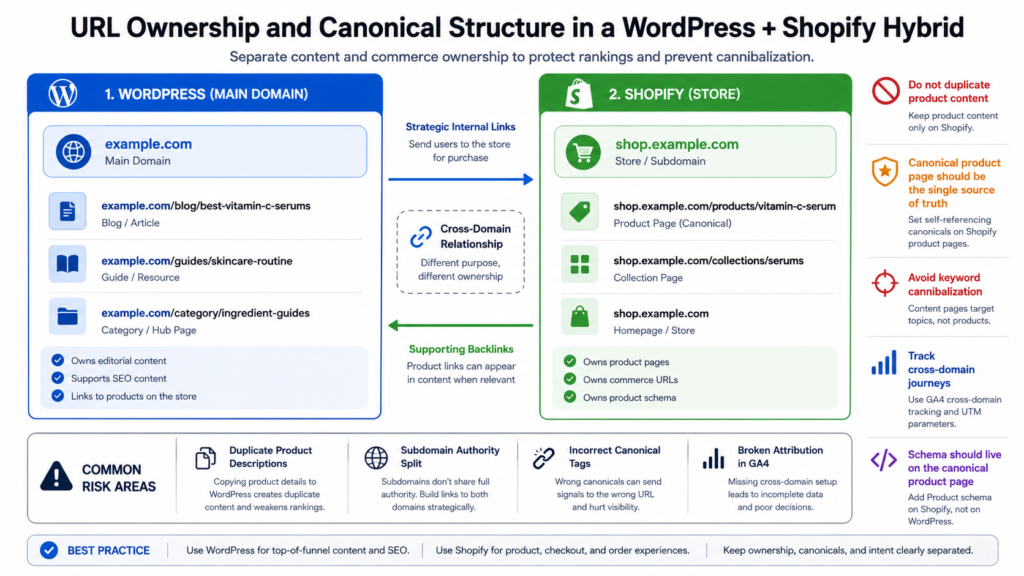
- Subfolder vs. subdomain. A subfolder (example.com/shop/) inherits main domain authority, but Shopify does not natively run inside WordPress subfolders without significant custom work. A subdomain (shop.example.com) is more common, but Google may treat it separately.
- One home for product pages. Shopify should own /products/ and /collections/. WordPress site should own /blog/, /guides/, and landing pages. Do not let both platforms host competing product content.
- Canonical tags. If a product is referenced in both places, the canonical must point to the single source of truth. Usually Shopify for products, WordPress for editorial.
- Avoid cannibalization. A WordPress article “Best Vitamin C Serums” linking to Shopify product pages is fine. The same article containing a duplicate product description that could outrank the Shopify page is not.
2. Analytics and Attribution
Google Analytics 4 and ad pixels require careful configuration.
- Referral exclusion. Without it, Shopify checkout appears as a new traffic source, breaking campaign attribution.
- Cross-domain tracking. Sessions must persist across WordPress site and Shopify. If UTM parameters strip during checkout, you lose visibility into which campaigns drive revenue.
- Purchase attribution. Revenue must map back to the original traffic source. If this fails, your marketing team cannot answer “Which channel drove this sale?”
3. Product Schema and Indexation
- Schema lives on the canonical page. If the canonical product page is on Shopify, product schema must be there, not on WordPress embeds.
- Indexation control. WordPress pages with Buy Buttons or product references should not be indexed as primary product pages.
4. Core Web Vitals and Mobile Handoff
- Adding Shopify embeds (Buy Buttons, JavaScript snippets) to WordPress increases render-blocking resources and can hurt Largest Contentful Paint and Interaction to Next Paint.
- With mobile commerce dominating sales, any handoff from WordPress content to Shopify checkout must be seamless on 4G/5G. Friction increases abandonment.
Cost and Operational Risks
- Two admin systems. Inventory and orders in Shopify; content and SEO in WordPress. Staff must learn both UIs.
- Plugin and app maintenance. WordPress plugin updates are a major vulnerability vector. Shopify app updates add a second queue. Every customization increases testing across both systems.
- Product sync. Editing a product in Shopify can break WordPress references — Buy Buttons, links, embeds — or show outdated pricing during campaigns.
- Policy alignment. Shopify handles tax and shipping, but WordPress content must reflect those policies accurately. Discrepancies create legal and customer-service risk.
- Support ownership. When checkout fails, is it a Shopify issue, a WordPress plugin conflict, or the integration layer? Blurred responsibility slows resolution — and creates a blame game between teams.
Before You Commit Checklist
Answer before choosing a hybrid architecture:
- Are product URLs indexed on one domain only?
- Is GA4 cross-domain tracking tested and verified?
- Are Shopify checkout referrals excluded in your analytics property?
- Is Product schema generated on the canonical product page?
- Are WordPress pages protected from plugin bloat that hurts Core Web Vitals?
- Is there one owner for SEO architecture who understands canonicals and indexation?
- Is there one owner for analytics attribution who can explain cross-domain behavior?
- Is inventory and product sync owned by someone with access to both platforms?
If you answer “no” or “unsure” to more than two, pause. Fix the gaps first, or choose a simpler stack.
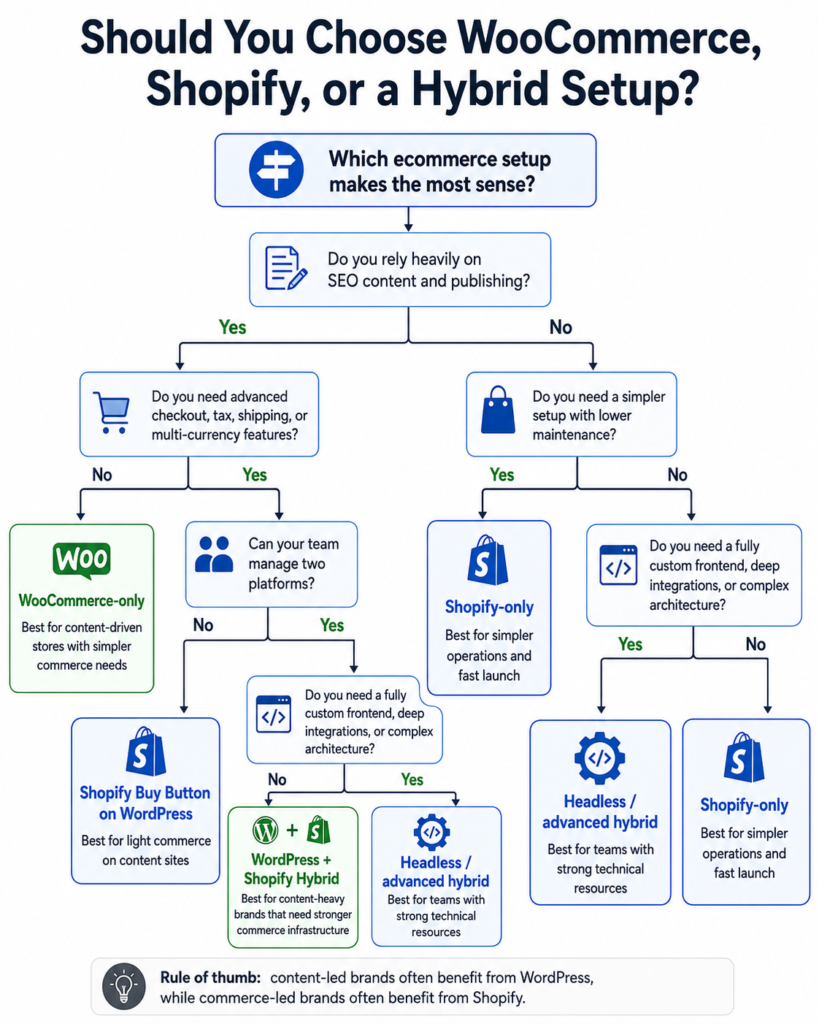
Decision Matrix: Score Your Readiness
Rate your business 1–5 on each criterion (1 = minimal need; 5 = critical need).
| Criterion | 1 | 2 | 3 | 4 | 5 |
| Content dependency (long-form content, SEO blog traffic, editorial publishing) | Minimal content | Occasional blog | Regular content | Content is core strategy | Publisher/media model |
| Checkout complexity (advanced tax, multi-currency, B2B pricing, global shipping) | Simple flat-rate | Basic tax | Some regional complexity | Multiple currencies/taxes | Enterprise-grade checkout |
| SEO control needs (schema, canonicals, internal linking for rankings) | No SEO team | Basic SEO | Managed SEO | Aggressive SEO growth | SEO-first business model |
| Performance sensitivity (page speed impacts revenue; Core Web Vitals target) | Not a priority | Nice to have | Important | Competitive necessity | Sub-2-second requirement |
| Security/compliance sensitivity (sensitive data, compliance audits, breach risk) | Low risk | Standard precautions | GDPR/CCPA concerns | High-risk data | PCI/regulated industry |
| Team technical capacity (devs, SEOs, PMs who can own two platforms) | Solo founder | Small generalist team | One technical hire | Dedicated dev + SEO | Full in-house team |
| Budget tolerance (dual platform costs, agency retainers, maintenance) | Bootstrapped | Tight budget | Moderate | Flexible | Well-funded |
| Analytics complexity tolerance (cross-domain GA4, attribution modeling, UTM hygiene) | Basic GA4 | Some UTM use | Managed dashboards | Custom attribution | Data-team maturity |
Next steps based on your score:
- 32–40: Plan a full hybrid with dedicated SEO/analytics architecture. Hire or assign owners for URL canonicals, cross-domain tracking, and product schema before launch.
- 24–31: Test with Shopify Buy Button or a phased migration. Start with one product line or one content category. Validate tracking and canonicals before scaling.
- 8–23: Choose Shopify-only or WooCommerce-only. Focus on selling, not systems engineering. Revisit hybrid only when content volume or checkout complexity forces the issue.
Final Recommendation
A WordPress + Shopify hybrid is not automatically better. It is justified when content volume, SEO equity, and checkout complexity outweigh the cost of managing two platforms.
Choose hybrid if: you are a content-heavy brand with established organic traffic, a clear SEO owner, and a team that can maintain two systems.
Choose Shopify-only if: you are a D2C startup, dropshipping business, or brand with minimal editorial content. Fastest path to reliable checkout.
Choose WooCommerce-only if: you run a content-driven store with a simple catalog, your team knows WordPress well, and HPOS performance is adequate for your order volume.
The best ecommerce platform is the one your team can maintain, measure, and improve without losing customer focus.