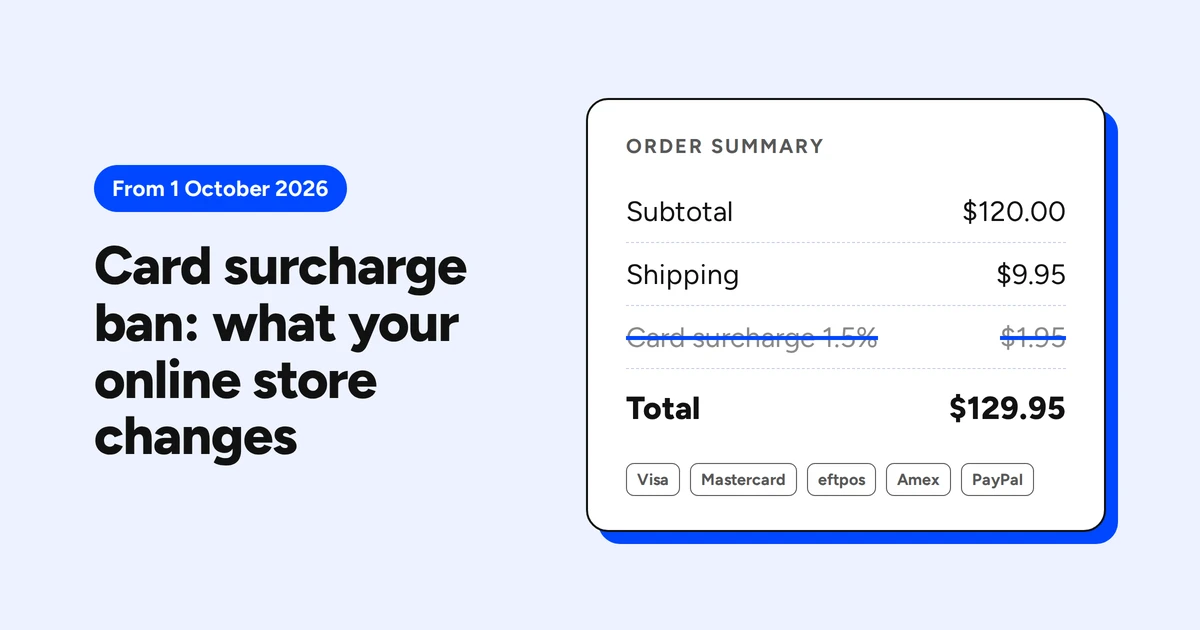

Since 1 October 2026, an Australian online store cannot add a surcharge when a customer pays with Visa, Mastercard or eftpos. The ban covers credit, debit and prepaid cards, cards issued overseas, and cards saved in a phone wallet. American Express and UnionPay dropped surcharging the same day, and PayPal followed on 5 October.
Online stores did not get an exception. The Reserve Bank of Australia (RBA) considered keeping surcharges for online payments only. It rejected the idea, partly because it would ‘continue to enable drip pricing’ (RBA Conclusions Paper, chapter 2).
None of the top-ranking guides we read explains where the surcharge actually lives on a store. Your payment provider switched off its own setting. It did not switch off the plugin, the app or the line of code that adds a fee to your cart. On 9 October we re-read 16 Australian seller pages that still talk about card fees. Two had been updated.
In brief
- The surcharge ban applies online, in store and in phone wallets, for credit, debit, prepaid and overseas cards.
- Amex, UnionPay and PayPal removed surcharging too. Articles that call Amex exempt confuse not being regulated by the RBA with being allowed to surcharge.
- Stripe and Square turned off their own surcharge features. A fee added by a WooCommerce plugin, a Shopify app or custom code is still yours to remove.
- Renaming the fee does not help. A charge that applies because someone pays by card is a surcharge, whatever it is called.
- You can still raise prices, offer a discount for a cheaper payment method, or charge fees that apply to everyone.
Which card payments the surcharge ban covers
A card surcharge is an extra amount added to the price because the customer pays by card. The ban on it is not a law the RBA wrote for merchants. The RBA removed its own prohibition on ‘no-surcharge’ rules. The three designated card networks, eftpos, Mastercard and Visa, then each introduced one from 1 October 2026 (RBA FAQ). Visa’s rule is blunt: a business ‘must not add any amount over the advertised or normal price’ (Visa).
| Payment method | Can an online store add a surcharge now? | Since |
|---|---|---|
| Visa, Mastercard, eftpos (credit, debit, prepaid) | No | 1 October 2026 |
| The same cards issued overseas | No | 1 October 2026 |
| Cards in Apple Pay or Google Pay | No | 1 October 2026 |
| American Express | No, Amex removed it itself | 1 October 2026 |
| UnionPay | No, removed it itself | 1 October 2026 |
| PayPal | No, ‘a surcharge or any other fee’ is barred | 5 October 2026 |
| Afterpay | No, its merchant agreement bans it | Long before the RBA change |
| Other buy now, pay later | Not covered by the RBA. Check your provider’s merchant terms | |
| Bank transfer, PayID | No card rule applies. Discounts are the safer move |
Amex is where most of the confusion sits. It is not regulated by the RBA the way the three designated networks are. It still decided to remove surcharging from 1 October and withdrew from its undertaking with the RBA that day (RBA regulations page). The ACCC lists Amex in the ban alongside Visa, Mastercard and eftpos (ACCC).
PayPal is the one that catches WooCommerce stores, because a PayPal fee was a common plugin rule. Two stores in our sample below still list PayPal fees of 2% and 2.8%. From 5 October, PayPal’s own terms say you ‘must not impose a surcharge or any other fee for accepting PayPal’ (PayPal policy updates).
B2B stores are not exempt either. A business buyer paying by card gets the same treatment as a consumer, unless a network’s rules say otherwise (RBA FAQ).
What 16 seller websites still said 8 days later
We wanted to know how fast sellers update the words on their sites, so we measured it. On 9 October 2026 we ran 20 Google searches for surcharge wording, such as ‘a surcharge of 1.5% applies’. We kept only pages from Australian businesses that sell something. Articles, banks, payment companies and government pages were dropped. That left 16 seller pages. We loaded each one live and read the payment wording by hand.
Methodology and sample size. 16 pages, one per business, found through search rather than drawn at random. Each was classed by a person from the quoted wording, not by a script, and the quotes are kept with the date checked. Business names are left out on purpose: the point is how common the gap is, not who has it.
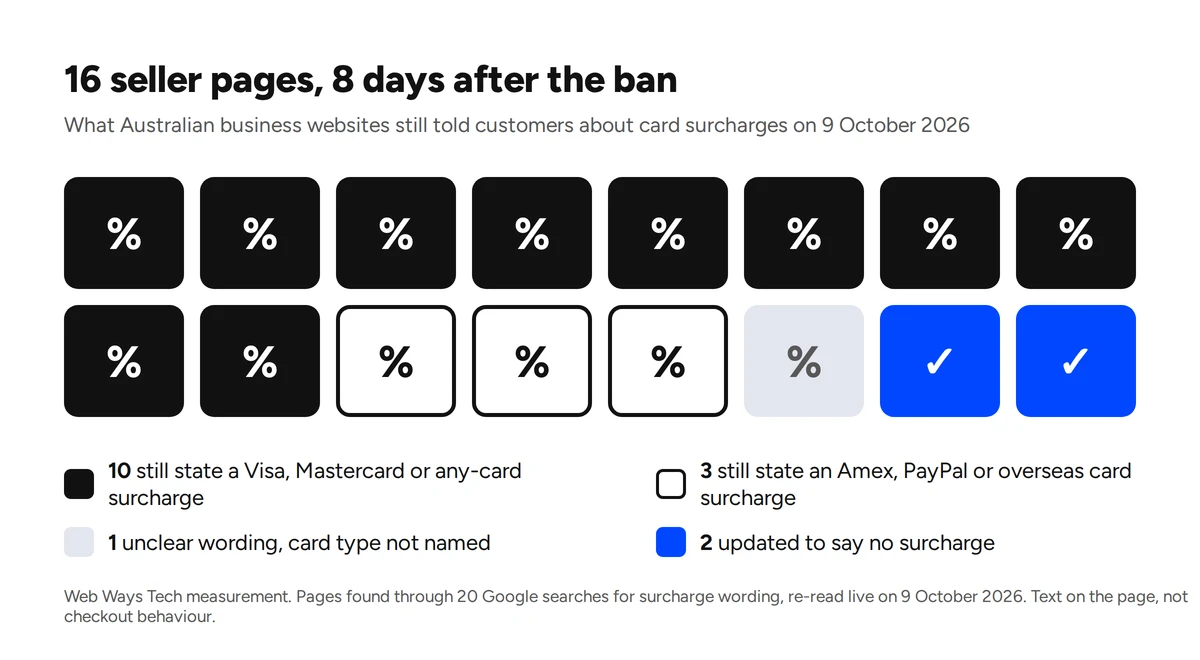
- 10 of 16 still tell customers a surcharge applies to Visa, Mastercard or all cards. Their Visa and Mastercard rates run from 0.5% to 1.5%.
- 3 of 16 still list a surcharge on Amex, PayPal or overseas cards only. Amex and PayPal have removed surcharging, and the rule covers overseas cards too.
- 1 of 16 says a 2% surcharge applies to ‘some of the transactions’ without naming the card.
- 2 of 16 were updated. One says ‘From the 1st October 2026 there will be no credit card or eft surcharges’.
The sample is small and built from search results, so read it as a signal, not a market rate. It also measures page text, not what the checkout charges. A store may have switched the fee off and forgotten the FAQ. That still matters. The ACCC’s price display rules cover a checkout price that differs from the displayed price, even by mistake. You must sell at the lower price, or stop selling until it is fixed (ACCC price displays). Wording that promises a fee the checkout no longer adds is a smaller problem than the reverse, but both need cleaning up.
Where a surcharge hides in a WooCommerce store
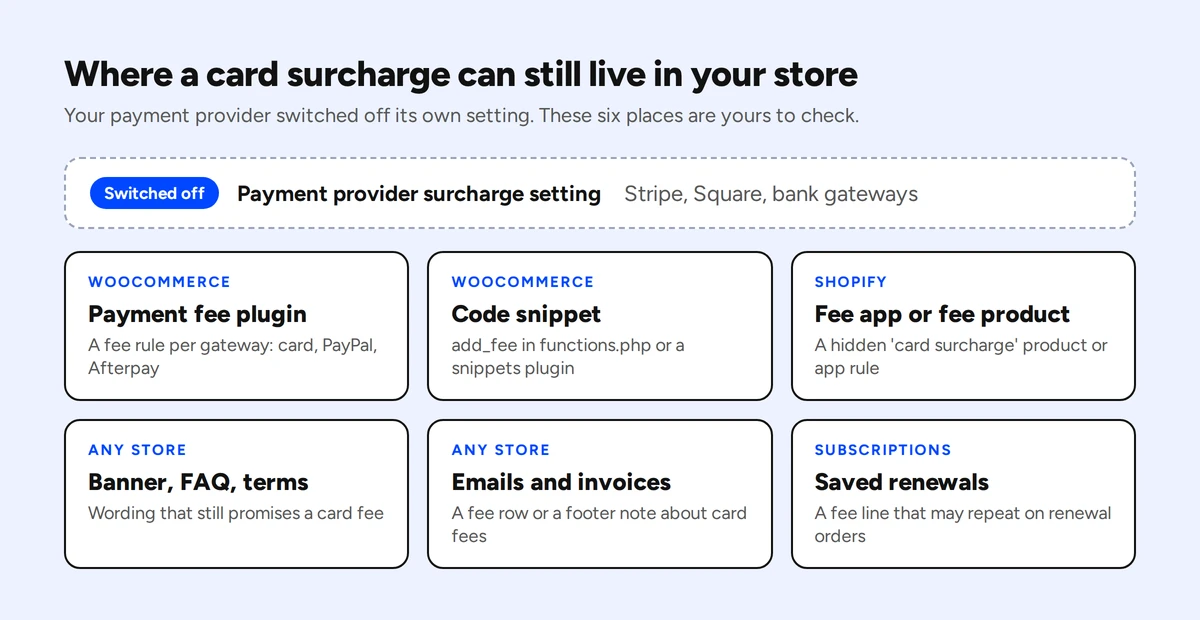
A surcharge on WooCommerce is almost always a fee line in the cart. WooCommerce has a fees API for exactly this. Its own help article on adding a surcharge to the cart still offers copy-and-paste code (WooCommerce docs). So the fee can come from three places, and you need to check all three.
- A payment fee plugin. The most installed on wordpress.org is Payment Gateway Based Fees and Discounts by Tyche Softwares, on 30,000 or more stores. Pay for Payment has 10,000 or more. Paid extensions on the WooCommerce marketplace do the same job. Open the plugin settings and look for a fee against each gateway: card, PayPal, Afterpay.
- A code snippet. Search your child theme’s
functions.phpand any snippets plugin forwoocommerce_cart_calculate_feesoradd_fee. If a developer added a ‘Card fee’ years ago, this is where it lives, and no settings screen will show it. - A conditional fee plugin. General extra-fee plugins can add a fee when a certain payment method is chosen. The rule hides inside a list of conditions, so read every rule, not just the plugin’s name.
None of the fee plugins we checked carries a notice about the Australian ban. One of them, in its paid version, can charge by card network or issuing country. Used that way, it is now a banned overseas card surcharge.
The good news is that the same plugins usually work in reverse. Payment Gateway Based Fees and Discounts and Pay for Payment can both apply a discount to a payment method instead of a fee. If you want to reward bank transfer or PayID, you may not need anything new. See the discount rules further down before you switch it on.
Where a surcharge hides in a Shopify store
Shopify cannot add a fee for a payment method on its own. Its payment customisation tools can rename, reorder or hide payment methods at checkout, set payment terms and flag an order for review. None of them adds a fee (Shopify developer docs). So if your Shopify store charged a card fee, it came from an app.
Two patterns cover most of them:
- A fee product. The app adds a hidden ‘Credit card surcharge’ product to the cart. Look in your product list for anything called surcharge, card fee, merchant fee or processing fee, including products hidden from the storefront.
- A fee line from a fee app. Several apps in the Shopify App Store add custom fees to the cart. Some of them restrict payment method fees to Shopify Plus, but at least one sells a credit card fee on its standard plan. So a store on any Shopify plan can have one.
Check Settings, Apps for any fee or surcharge app, and uninstall it or turn off its payment rule. Then check Settings, Checkout for a custom note about card fees, and your theme’s cart template for a hard-coded message.
Shopify Payments’ Australian terms already said you will not impose a surcharge where the law prohibits it (Shopify Payments terms). We could not find a separate Shopify notice about the 1 October change, so do not wait for one.
One cost catches Shopify stores that move to a discount instead. Take payment through a third-party provider instead of Shopify Payments and Shopify adds its own transaction fee. It is 2% on Basic, down to 0.2% on Plus (Shopify pricing). Manual methods such as bank deposit are exempt (Shopify Help Center). If your cheaper method runs through a third-party provider, a 1% discount can cost more than it saves.
What your payment service provider switched off, and what it left to you
Your payment provider turned off the surcharge feature it owned. It did not touch anything your store added on top.
- Stripe disabled surcharging in Australia. It also says plainly that it ‘won’t automatically remove surcharge-related code, disclosures, or pricing from systems that you or a third party operate’ (Stripe). A WooCommerce fee line is exactly that.
- Square switched off its own surcharge setting on 1 October. If you built a surcharge from a service charge, a tax or automatic tipping, Square ‘can’t turn it off for you’ (Square).
- PayPal now bars any extra fee for paying with PayPal, from 5 October. If your fee plugin had a PayPal rule, that rule is yours to delete.
- Bank gateways. NAB and CommBank say they disabled surcharging on their own online gateways. A plugin that adds a fee before the payment reaches the gateway is outside what they control.
- Afterpay banned surcharges in its own merchant agreement long before this. It says you must not charge a fee ‘on the basis that the Customer has elected Afterpay’ (Afterpay merchant agreement). If your store added one, it was already outside your contract.
In short, the gateway stopped charging the fee. Your cart may still be adding it to the order total, and the customer pays it either way.
The words to change on your store
The fee is usually gone from one place and still described in five others. Here is what to look for, and what to replace it with.
- Banner or announcement bar. Old: ‘A 1.5% surcharge applies to card payments’. New: remove it, or ‘No card surcharges. The price you see is the price you pay’.
- Checkout payment method label. Old: ‘Credit card (+1.5%)’ or ‘PayPal (+2.6%)’. New: ‘Credit or debit card’, ‘PayPal’.
- FAQ, payments section. Old: ‘Card payments attract a merchant fee’. New: ‘We accept Visa, Mastercard, eftpos, Amex and PayPal. There is no surcharge on any of them’.
- Terms and conditions, payment clause. Old: ‘Payments by credit card incur a surcharge of 1.2%’. New: ‘Prices shown include all card payment costs. We do not charge a fee for paying by card’.
- Order confirmation email. Old: a ‘Card fee’ row in the totals. New: check the template, because a fee line prints automatically if the order has one.
- PDF invoice or tax invoice. Old: a ‘Surcharge’ line or a footer note about card fees. New: remove the note and test one new order.
- Quotes and payment links. Old: ‘Pay by card, 1.5% fee applies’. New: remove it. The payment date decides, so this covers invoices issued before 1 October and paid after it.
The last item surprises people. The RBA’s rule follows the payment date, not the invoice date. For a card payment made on or after 1 October 2026, ‘surcharging may no longer be available even if the invoice was issued earlier’ (RBA FAQ). If a September invoice with a card fee is still unpaid, reissue it without the fee or waive the fee when the customer pays.
Your terms page probably sits in the footer, next to the privacy policy. It is worth reading in full once. Our study of Australian website footers covers what else usually lives there.
What you can still charge after the card surcharge ban
The test is one question: would the customer pay this fee if they paid another way? If the answer is no, it is a card surcharge. The networks define it as a fee applied ‘because a consumer pays by card’ (cardsurcharge.com.au).
Still allowed:
- Shipping, handling and small-order fees that every customer pays, whatever the payment method.
- Raising your prices. The ACCC says you can build card costs into your prices. You must not mislead customers about why prices went up.
- A discount for a cheaper method, such as 5% off for PayID or bank transfer.
- Choosing which methods you accept. You can stop taking a payment method altogether.
No longer allowed:
- A renamed surcharge. The ACCC warns against describing a card surcharge ‘as another type of fee or charge’. Businesses that do this ‘may be engaging in misleading conduct’ (ACCC). Stripe gives ‘service fee’ and ‘handling fee’ as examples that do not escape the rule.
- A fee on small card orders only. Square’s guidance treats a fee that applies only to card payments under a threshold as a surcharge.
- A fee for overseas cards. The rule covers foreign-issued Visa, Mastercard and eftpos cards too.
A discount works only one way round
The ACCC gives an online example that fits most stores. A clothing retailer offers 10% off for PayID. Products show the full price everywhere, a banner explains the discount, and the PayID option at checkout is labelled with it. The total drops only when the customer picks PayID (ACCC price displays).
The reverse is a surcharge with extra steps. Say your product pages show the lower price and the total rises when someone picks a card. You have added an amount ‘over the advertised or normal price’. That is exactly what the Visa rule bans.
A discount also has a cost. Check what taking PayID or bank transfer costs you, in fees and in slower dispatch while you wait for the money to clear. Then decide whether the discount pays for itself.
How much to raise prices to cover card payment costs
Passing the card fee to the customer has to stop. The honest way to cover the cost of accepting card payments is a small price rise. The formula is the price divided by one minus your fee rate. A $50 product with a 1.5% fee becomes $50 ÷ 0.985, which is $50.76.
| Your current price | Fee 1.0% | Fee 1.5% | Fee 2.0% |
|---|---|---|---|
| $20 | $20.20 | $20.30 | $20.41 |
| $50 | $50.51 | $50.76 | $51.02 |
| $150 | $151.52 | $152.28 | $153.06 |
Two adjustments make this more accurate:
- Fixed fees weigh more on cheap orders. A 30 cent per-transaction fee is 1.5% of a $20 order but only 0.2% of a $150 one. If your average order is small, look at the fixed fee first.
- Not every order is a card order. If 70% of your orders are paid by card at 1.5%, your blended cost is about 1.05%. Raising everything by 1.5% overcharges the customers who pay another way.
Google Shopping expects the price in your Merchant Center feed to match the product page and checkout (Google Merchant Center Help). Update both in the same session. And keep the reason honest. The ACCC’s example is a salon whose $60 haircut with a 1% surcharge becomes $60.60. If the salon goes to $65 because of energy and labour costs, it must not tell customers the rise is due to the surcharge changes.
Interchange fees should fall
Interchange is the wholesale fee the customer’s bank earns on each card payment, built into what your provider charges you. Your processing fees may drop as it falls. On 1 October the interchange cap on Australian-issued consumer credit cards fell from 0.8% to 0.3%. Debit fell to 8 cents or 0.16% (RBA Conclusions Paper, chapter 8). Whether that reaches you depends on your provider passing it on. From 30 January 2027, large acquirers have to publish how much they passed through (RBA FAQ).
Test your checkout before a customer does
A settings screen tells you what should happen. A test order shows what does. Run one order through each payment method you offer and check the same five things each time.
- Payment methods. A credit card, a debit card, Amex if you take it, PayPal, a phone wallet and any buy now, pay later option.
- Cart and checkout total. Products plus shipping, nothing else. No fee line appears when you switch method.
- The amount charged. Matches the checkout total to the cent in your payment dashboard.
- The email and the invoice. No fee row, no footer note about card surcharges.
- A refund. Refunds the full order without a leftover fee line.
Clear your page cache after any change. On WordPress, a caching plugin or Cloudflare can keep serving the old checkout notice until the cache expires. It looks as if the fix did not work.
Subscriptions need their own check
WooCommerce Subscriptions applies cart fees to the subscription by default. Its documentation says those fees ‘are then also applied to subsequent transactions’ (WooCommerce Subscriptions docs). A fee saved on an existing subscription may keep renewing after you switch the plugin off. Open one active subscription and look at its line items. If a card fee is there, remove it from each subscription before the next billing date.
Who enforces the surcharge ban
The card networks and your payment provider enforce it, not the ACCC or the RBA. A business that keeps surcharging ‘may be contacted by their payment service provider or bank’ and ‘may be subject to penalties’ (cardsurcharge.com.au). Visa takes customer reports and passes them to the business’s bank to investigate.
The ACCC’s part is price honesty: misleading prices, disguised fees and false reasons for price rises. Debit card surcharges and credit card surcharges are treated the same way. The maximum for false or misleading representations made from 28 March 2026 is the greater of three amounts. They are $100 million, three times the benefit, or 30% of adjusted turnover during the breach (ACCC fines and penalties).
The RBA also left itself a backstop. If surcharging carries on, it ‘could recommend that the Government legislate a ban on surcharging’ (RBA Conclusions Paper).
Three more dates are worth a calendar entry:
- 30 October 2026: card networks and large acquirers start publishing their card fees.
- 1 April 2027: interchange on foreign-issued cards is capped at 1.0%, and every acquirer must send more detailed statements.
- 1 July 2027: the unfair trading practices law starts. For consumer goods and services, a compulsory per-transaction fee will have to be shown close to the base price, not only at checkout.
Frequently asked questions
Can an Australian online store still charge a credit card surcharge?
No. Since 1 October 2026, eftpos, Mastercard and Visa rules ban card surcharges online, in store and in mobile wallets, on credit, debit and prepaid cards. The RBA considered keeping surcharges for online payments and rejected it.
Can I still surcharge American Express?
No. Amex is not regulated by the RBA in the same way, but it removed surcharging itself from 1 October 2026. The ACCC lists Amex in the ban with Visa, Mastercard and eftpos.
Can I add a fee for PayPal?
No, not from 5 October 2026. PayPal’s terms say you must not impose ‘a surcharge or any other fee for accepting PayPal as a payment method’.
Can I call the surcharge a service fee instead?
Only if every customer pays it, whatever method they use. A fee that applies because someone pays by card is a surcharge under any name, and the ACCC says relabelling it may be misleading conduct.
Can I offer a discount for bank transfer or PayID?
Yes. Show the full price on product pages, explain the discount upfront, and apply it at checkout when the customer picks that method. Never show the discounted price as the main price.
What about surcharges on orders from before 1 October?
The network rules apply from 1 October 2026, and the RBA ties them to the payment date. A surcharge on a payment made before then was charged under the old rules. For an invoice issued in September and paid in October, the RBA says surcharging ‘may no longer be available’, so drop the fee. For a refund, ask your payment provider how to treat the original fee line.
Need a hand with your checkout?
Most of this is an hour of careful clicking for someone who knows where WooCommerce and Shopify keep their fees. If your store was built by someone else, or the fee came from code nobody remembers adding, we can find it and clear it out. We build and fix online stores for Australian businesses.
Talk to us about fixing your current website
If you are still setting a store up, our guide on how to start an online store in Australia covers the ABN, GST and payment decisions that come before checkout.
This article is general information about the card surcharge rules in Australia as at 9 October 2026. It is not legal or financial advice. Network rules can change, and your payment provider’s merchant agreement applies to you directly. Check the RBA, ACCC and cardsurcharge.com.au for current guidance.