Search for NDIS website accessibility and the first results are the accessibility statements of the National Disability Insurance Scheme itself. Useful pages, but they describe what the scheme does with its own websites. They do not tell you what you owe on yours, or what NDIS participants run into when they try to use it.
Your obligation exists. It just does not come from where most people assume, and the version of the standard has moved.
This is general information, not legal advice. Where a rule matters to your registration, read the primary source and take your own advice.
Key takeaways
– The NDIS Commission does not set a WCAG level for provider websites. The Disability Discrimination Act 1992 creates the duty, because it covers providers of goods and services.
– Australian Human Rights Commission guidance says organisations should conform with WCAG 2.2 at a minimum Level AA. Most provider sites are still built to 2.1.
– The NDIS Practice Standards add a separate duty about accessible information and accessible complaints, which your website can visibly satisfy.
– Accessibility widgets do not close either gap. Sixty-seven per cent of practitioners surveyed by WebAIM in 2021 rated them ineffective, and the US regulator ordered one vendor to pay one million dollars over its compliance claims.
– A real check on a ten-page site takes about 8.5 hours and produces a report, not a badge.
Does the NDIS Commission require WCAG on your website?
No. Search the NDIS Practice Standards for a Web Content Accessibility Guidelines (WCAG) version and you will not find one. The duty comes from the Disability Discrimination Act 1992.
The Australian Human Rights Commission states it plainly in its digital accessibility guidance:
“the Disability Discrimination Act requires that providers of goods and services do not discriminate against persons with disability”
Australian Human Rights Commission, Standards and guidelines for digital accessibility, retrieved 2026-08-07
You are a provider of services. That sentence is the one that reaches you.
The wording on the NDIS site describes a narrower group, which is where the confusion starts. Its accessibility page says this:
“Under the Disability Discrimination Act 1992, Commonwealth departments and agencies must ensure that people with disabilities can access online information and services”
NDIS, retrieved 2026-08-07
That sentence is about the agency, not about you. Read as your obligation, it suggests nothing applies until the Commission says so. That is the wrong conclusion.
Three layers sit on top of each other, and most guides collapse them into one:
- The Disability Discrimination Act 1992 is the layer that binds you, and it does so whether or not you are registered.
- AHRC guidance describes what meeting that duty looks like technically.
- The NDIS Practice Standards impose a separate duty about accessible information, covered further down.
The case law is older than the NDIS. The AHRC points to its own 2000 decision in Maguire v Sydney Organising Committee for the Olympic Games (No 2). A blind complainant, an inaccessible website, and a finding under the same Act that governs your service today.
Which WCAG version applies, and why 2.1 is behind
Level AA of WCAG 2.2. The AHRC guidance is explicit about it:
“Organisations should conform with WCAG 2.2 at a minimum Level AA and consider appropriate Level AAA success criteria such as video transcripts, audio contrast, clear links and section headings”
Australian Human Rights Commission, Standards and guidelines for digital accessibility, retrieved 2026-08-07
The same page states that WCAG “is required by government and non-government sectors alike”. WCAG 2.2 was released in October 2023. This is not a new standard catching anyone by surprise.
We read six Australian agency guides on NDIS provider websites in August 2026. Three named WCAG 2.1 as the standard to meet. One named 2.2 Level AA, one named both, and one named no version at all. The gap between those versions is six success criteria at Levels A and AA, and they are not cosmetic (W3C, retrieved 2026-08-07).
| Criterion | Level | What it checks |
|---|---|---|
| 2.4.11 Focus Not Obscured (Minimum) | AA | A sticky header does not hide the element you just tabbed to |
| 2.5.7 Dragging Movements | AA | Anything draggable also works without dragging |
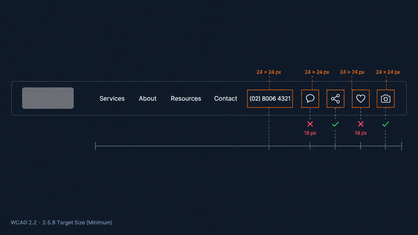
| 2.5.8 Target Size (Minimum) | AA | Pointer targets are “at least 24 by 24 CSS pixels”, with five exceptions |
| 3.3.8 Accessible Authentication (Minimum) | AA | Signing in does not require solving a puzzle or recalling something |
| 3.2.6 Consistent Help | A | Contact and help sit in the same place on every page |
| 3.3.7 Redundant Entry | A | A multi-step form does not ask for the same information twice |
Three more arrived at Level AAA: 2.4.12 Focus Not Obscured (Enhanced), 2.4.13 Focus Appearance and 3.3.9 Accessible Authentication (Enhanced). Those sit outside the scope most organisations work to.
Start with 2.5.8. In our own assessments the targets that most often come in under 24 pixels square are the social icons and the phone number in the header. A site built to 2.1 had no reason to check them.
Even the scheme itself is mid-migration. The NDIS website “aims to meet” WCAG 2.1, and adds: “We are working to comply with WCAG 2.2 to level AA” (NDIS, retrieved 2026-08-07).
Its own regulator is in the same position. The Commission’s stated goal is “to achieve WCAG 2.2 Level AA as minimum standard” (NDIS Quality and Safeguards Commission, retrieved 2026-08-07).
That is worth holding onto. Nobody is finished.
What the NDIS Practice Standards ask for, separately
The Practice Standards do not name WCAG. They ask for something adjacent: that information reaches participants in a form they can actually use, and that complaints are easy to make.
The Standards “specify the quality standards that need to be met by registered NDIS providers”. Each module carries quality indicators. Auditors use them to assess compliance. They also indicate “how providers may show compliance” (NDIS Quality and Safeguards Commission, retrieved 2026-08-07). The core module covers rights and responsibility for participants. The verification module covers complaints management and resolution.
Read that phrase again: how providers may show compliance. A website is a place where showing is cheap.
It is also where accessibility barriers meet a participant first, before any phone call and before they read a line about your NDIS service.
In practice that means four things on the site itself:
- A complaints page that works. Findable from every page and readable in plain English. The form must be completable by keyboard and screen reader.
- Easy Read where it earns its place. Not the whole site. The pages a participant needs most.
- A stated way to report an access problem. An email or phone number for people who cannot use something on your site.
- Service information in plain language, matching what you are actually registered to deliver.
The regulator models all four. It publishes Easy Read versions for priority topics, naming two in particular. One is reporting an issue or complaint about a provider or worker. The other is the rights of people with disability. It is also “working on making more information available in Auslan (Australian Sign Language)”. It gives a phone number and email for accessibility problems, and aims to respond “within 5 business days” (NDIS Quality and Safeguards Commission, retrieved 2026-08-07).
Copy that pattern. The body assessing you has already published the reference implementation.
Why accessibility widgets do not fix this
An overlay is JavaScript that runs on top of your site. It cannot rewrite your source code. That single fact explains most of what follows.
The pitch is a toolbar of accessibility features: bigger text, inverted colours, a dyslexia font. The accessibility issues that actually stop people are underneath, in the markup.
If a heading is marked up as a styled div, an overlay cannot make it a heading. If a form field has no label associated with it, an overlay cannot invent the association reliably. There is a worse case. An overlay that announces itself as an aid for blind users can collide with the screen reader that person already runs. It takes over shortcuts they depend on.
Practitioners have been measuring this. WebAIM’s third survey of web accessibility practitioners, published in March 2021, drew 758 responses. Of those, 67 per cent rated overlays, plugins or widgets as not at all or not very effective. Among respondents with disabilities the figure rose to 72 per cent, and only 2.4 per cent called them very effective (WebAIM, retrieved 2026-08-07).
That survey is the most recent WebAIM ran on the question, and it is now several years old. The evidence that has arrived since points the same way.
The Overlay Fact Sheet, a public statement that overlays cannot deliver conformance, now carries 1,031 signatories. A regulator has weighed in too. In April 2025 the US Federal Trade Commission approved a final consent order against the overlay vendor accessiBe, requiring it to pay one million dollars. The complaint alleged the product “did not make all user websites WCAG-compliant” and that the claims were “false, misleading, or unsubstantiated” (Federal Trade Commission, retrieved 2026-08-07).
The order itself is the part worth reading. It bars the company from claiming its automated products can make any website conform, “unless it has the evidence to support such claims”. That is the standard this article argues for, written by a regulator.
One thing worth knowing if you are researching this topic. Several vendors that publish guidance on NDIS provider websites also sell overlay products, and Recite Me appears on the Overlay Fact Sheet product list. That does not prove harm in any particular installation. It does mean the advice is not neutral, and it is worth checking who wrote a guide before following it.
Our position is simple, and it is on our service pages: we do not install overlays. Removing one and fixing the underlying markup is slower and it is the only thing that changes the experience.
What actually breaks a website, in order
Not the things people expect. The most common failure by a wide margin is low contrast text, and the second is an image that tells website visitors nothing.
WebAIM tests one million home pages every year. In 2026, 95.9 per cent carried detected WCAG 2 failures, up from 94.8 per cent the year before. The average page carried 56.1 errors against 51 in 2025 (WebAIM Million, retrieved 2026-08-07). The web is getting less accessible, not more.
Six failure types account for 96 per cent of everything detected.
Ask the people using the sites and the picture is consistent. WebAIM’s tenth screen reader user survey was published in February 2024 with 1,539 valid responses. Respondents ranked CAPTCHA as the single most problematic item. Next came interactive elements such as menus and dialogs behaving unexpectedly. Third came links and buttons whose labels carry no meaning out of context (WebAIM, retrieved 2026-08-07).
None of that is exotic. Contrast, alt text, form labels, link text, a CAPTCHA on your enquiry form. It is a short list, and a short list is a plan.
How to test your site
Automated tools find a minority of the problems. They are still the right first step, because they are fast and free.
Four accessibility tools cover the automated pass:
| Tool | What it does |
|---|---|
| axe DevTools (Deque) | The main automated run, and the industry default |
| WAVE (WebAIM) | A visual map of problems, quick for checking structure |
| Lighthouse | Built into Chrome, useful as a cross-check |
| Colour Contrast Analyser (TPGi) | Exact contrast ratios, including interface elements |
What the tools miss is a question of usability rather than of code, and it takes five passes by hand:
- Keyboard. No mouse. Tab, Shift and Tab, Enter, Escape. Keyboard navigation is the pass that finds the most, and it needs no tooling: can you reach everything, is the focus visible, is the order sensible, is there a skip link, are there any traps?
- Screen reader on desktop. Headings, landmarks, links read out of context, form labels, error announcements.
- Screen reader on mobile. The same, plus gestures.
- Zoom and reflow. Two hundred per cent zoom at 320 pixels wide. No clipped text, no horizontal scrolling.
- Forms, end to end. Not the field. The path: found it, filled it, got it wrong, fixed it, submitted it, saw the confirmation.
That fifth one is where most sites fail, and it is the one nobody checks.
One side effect is worth knowing. Alt text, real heading structure, descriptive link text and captions are read by search engines as well as by screen readers. Work you do to improve accessibility shows up in SEO without being aimed at it. That is a reason to do it properly rather than a reason to do it at all.
Which screen reader to test with in Australia
JAWS, then NVDA. Australian respondents to the WebAIM survey named JAWS as their primary screen reader 45.8 per cent of the time, against 37.5 per cent for NVDA. Globally the split is closer, at 40.5 to 37.7 (WebAIM, retrieved 2026-08-07).
NVDA is free and it is the right tool to build against. For an Australian audience it should not be the only one you test with.
What to test, and how much of it
Not “the whole site”. The W3C scopes conformance to complete pages and complete processes. The AHRC quotes the rule, which is that “all Web pages in the process conform at the specified level or better” (Australian Human Rights Commission, retrieved 2026-08-07).
There is now a named method for the work itself. On 23 July 2026 the W3C published the WCAG Evaluation Methodology 2.0 as a Group Note (W3C, retrieved 2026-08-07). It sets out how to define scope, sample, evaluate and report, and it is written for digital products rather than websites alone. It is “suitable for use in different evaluation contexts, including self-assessment”, so you can follow it in-house.
What it costs in hours
Here is our own budget for a build of up to ten pages. We publish it because no one else in this niche puts a number on the work.
| Stage | Hours |
|---|---|
| Automated run across all templates | 0.5 |
| Keyboard pass | 1.0 |
| Screen reader, key templates | 1.5 |
| Screen reader, mobile | 0.5 |
| Contrast, zoom and reflow | 1.0 |
| Forms and the six new 2.2 criteria | 1.0 |
| Fixes | 1.5 |
| Report and accessibility statement | 1.0 |
| Re-check of what was fixed | 0.5 |
| Total | 8.5 |
One condition makes that number honest. It holds when the site was built accessible and the check confirms it. If every pass turns up twenty defects to repair by hand, the work is a rebuild, and it costs like one.
What a finished check looks like on paper
A check with nothing to show for it is indistinguishable from a claim. The difference is a document.
Three artefacts close it out:
- A test report. Dates, the pages and processes covered, the criteria tested, and the tool and screen reader versions used. Then the defects found with severity, what was fixed, and what was not fixed and why.
- An accessibility statement on the site. The W3C WAI publishes a generator for it. A statement should carry a commitment to accessibility, the standard applied, and contact details for people who hit a problem, plus known limitations.
- A re-check, annually. Accessibility decays as content gets added. New images without descriptions, new PDFs without structure, new video without captions.
The section that makes the report credible is the one listing what was not fixed. Without it the document reads as marketing. Include it even when it holds a single line.
This is also why the wording matters. Say “tested against WCAG 2.2 Level AA”, not “WCAG 2.2 AA compliant”. Conformance has the scope rule above behind it, on a site the client will keep editing after you hand it over. Testing is something you did and can evidence. Compliance is a state you cannot guarantee on someone else’s behalf.
If your current site has never been through this, that is the normal starting position rather than a failing. Talk to us about fixing your current website.
Frequently asked questions
Does the NDIS Commission require WCAG on my website?
No. The Commission does not set a WCAG level for provider websites. The duty comes from the Disability Discrimination Act 1992, which covers providers of goods and services. The AHRC digital accessibility guidance describes what meeting it looks like. The NDIS Practice Standards add a separate duty about accessible information and complaints.
Is WCAG 2.1 Level AA still enough?
Australian guidance points at 2.2 Level AA. The difference is six success criteria at Levels A and AA: focus not obscured, dragging movements, target size, accessible authentication, consistent help and redundant entry. A site built to 2.1 will usually fail target size first.
Will an accessibility widget make my site accessible?
No. In WebAIM’s 2021 practitioner survey, 67 per cent rated overlays as not at all or not very effective. Among respondents with disabilities that rose to 72 per cent. The Overlay Fact Sheet carries 1,031 signatories. In April 2025 the US Federal Trade Commission approved a final order requiring one vendor to pay one million dollars over its compliance claims.
How long does a proper check take?
About 8.5 hours for a build of up to ten pages, covering automated tools, five manual passes, fixes, the report and a re-check. That figure assumes the site was built accessible. Repairing an inaccessible site is a different job with a different price.
What if someone tells us our website is not accessible?
Have somewhere for them to say it. Publish an email or phone number for access problems and commit to a response time. The NDIS Commission publishes both and aims to respond within five business days, which is a reasonable benchmark to copy.
Where to start
The duty is older and broader than the NDIS, the version has moved to 2.2 Level AA, and the fixes that matter most are unglamorous.
- The law is the Disability Discrimination Act 1992, not an NDIS rule.
- The technical benchmark is WCAG 2.2 Level AA, per AHRC guidance. Older accessibility standards still quoted across the sector are behind it.
- The Practice Standards want accessible information and accessible complaints. Your site can show both.
- Widgets do not deliver either. Remove them and fix the markup.
- Test by keyboard and screen reader, and write down what you did not fix.
Accessibility is not a separate discipline bolted onto web design. Inclusive design is the ordinary version of the job done properly: markup that describes what it is, digital content that reads without sight, and a form that submits by keyboard. Accessibility compliance is what you can evidence afterwards, not a badge you buy.
Open your own header and measure the social icons. If they are under 24 pixels square, you have found your first defect, and you found it in a minute.
Talk to us about fixing your current website, or start with the free tools above and see what turns up.
More on how we build for providers: NDIS website design. The audit side of the same problem is covered in the NDIS audit checklist.
Sources retrieved 2026-08-07. Regulatory positions change; check the primary sources before relying on any statement here.